
What Is a Dynamic Overlay Photo Booth? (And Why Almost Nobody Has One)
Introduction
Some problems don’t quite register in their magnitude until they’re actually solved. Such is the case with a dynamic overlay photo booth.
We’re not here to simply say, “Hey! We did it first.” We are going to tell you the impact of what you had been missing out on all along. And the endless possibilities this opens up to.
What is a dynamic overlay photo booth?
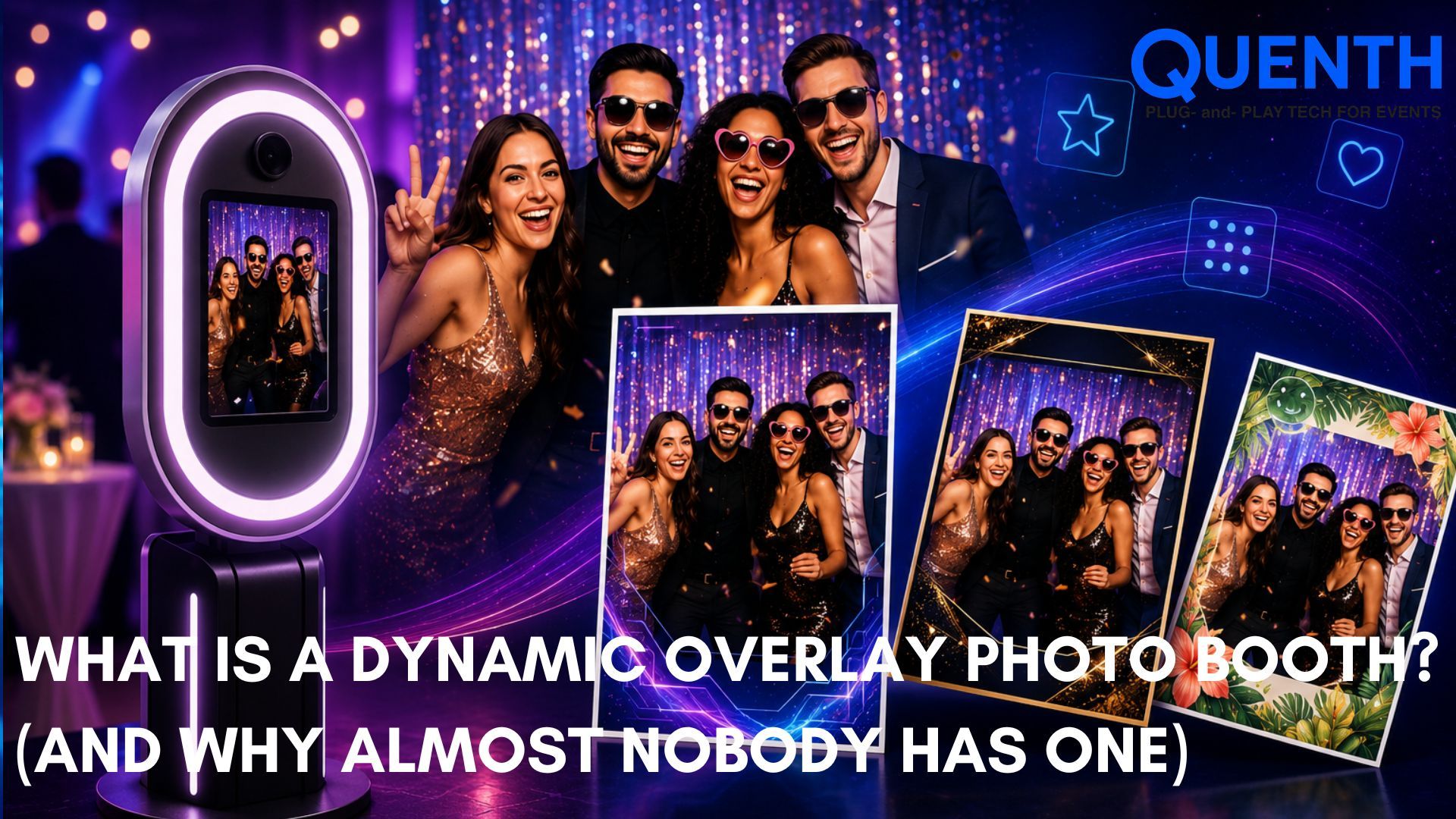
A dynamic overlay photo booth by Quenth is a booth where any and all information that a guest enters, while signing up for the event or while filling a short form as they walk into the booth, such as their name, job profile, a prediction, a pledge, a score — appears directly on their photo, live, as part of the printed or displayed template that is superimposed on the photo.
This is different from a standard overlay, which is a fixed frame or branding element that looks the same for every guest. A dynamic overlay changes per person, in real time, based on what that guest actually typed in.
That's the whole concept in one sentence. Everything below is why it matters more than it sounds like it should.
The overlay you already know
Almost every photo booth on the market today does some version of an overlay — a branded frame, a logo in the corner, an event hashtag or tagline, a fixed border with the event name on it. It's useful, even eye-catching. But it's static and can quickly start feeling redundant. Every guest gets the exact same frame. The only thing that changes is their photo inside it.
That's been the ceiling for photo booth personalization for years. Add a filter, add a sticker, swap a frame — but the content of the overlay itself never adapts to the person standing in front of the camera.
What changes with a dynamic overlay photo booth
With a dynamic overlay, the guest's own data becomes part of the design. Listed below are a few real examples of what this actually looks like in practice:
- ✓ A personalized badge — guest types their name and title at check-in, and it prints directly onto their photo as a proper event badge, not a generic frame with a blank line.
- ✓ A before/after template — built per guest, using whatever information or AI Photo Booth transformation applies to them specifically.
- ✓ A lucky draw entry card — guest's own name and entry number appear printed on their photo, not on a separate slip of paper.
- ✓ A live leaderboard portrait — a guest's current quiz score or rank rendered directly onto their own photo as they walk away.
In every case, the template itself is the same starting point — but what fills it is different for every single guest, generated automatically, with no manual design work per person.
It doesn't have to look like a form field
The examples above are functional — but a dynamic overlay isn't limited to a name printed in a plain text box. The template itself can be fully art-directed.
Consider this: At a recent corporate leadership event, guests stepped into an AI caricature booth and walked away with something that looked nothing like a standard printout: a tilted polaroid-style photo, taped at an angle onto a branded background, with a handwritten-style caption underneath and a personal note beside it — all generated automatically, per guest, in the same few seconds it took to take the photo.
Nothing about that output was manually designed per person. The tilt, the tape, the handwritten caption style, the note — all of it is baked into one template. The only thing that changes guest to guest is the photo and the data pulled in around it. That's the actual range a dynamic overlay covers: from a clean, functional badge to a fully styled keepsake, without changing the underlying system.
Why almost nobody else has this
Most photo booth software is built around one core idea: capture a photo, apply a fixed visual treatment, and output the result. That works well for filters, stickers, and static branding — but it assumes the data layer and the photo layer are separate systems that never talk to each other.
Building a dynamic overlay means those two layers have to be connected from the start — the platform that captures what a guest types in has to be the same platform rendering their photo template, in real time, without a delay. That's a meaningfully different architecture than a standalone photo booth app, which is likely why it's a feature we've genuinely not come across anywhere else in the market.
How it fits into the rest of the platform
Dynamic Overlay isn't a standalone trick — it's what happens when a few engines work together:
- ✓ Lead Capture feeds the guest data (name, number, custom fields) into the system
- ✓ Booths capture the photo or video
- ✓ Print Layout renders the dynamic template — badge, before/after, entry card, or a fully styled keepsake, whatever the flow calls for
- ✓ Crowdplay, when it's part of the flow, can feed live scores or entry numbers into the same overlay
None of these need to be built separately for a dynamic overlay to work — they're the same engines already covered in our full guide to event photo and video booths, just connected in a specific way.
And it's not limited to a photo print. The same dynamic fields — a guest's name, their photo, whatever they typed in — can just as easily feed a Display Layout wall instead of, or alongside, a printed output. One guest submission, rendered wherever it needs to show up: on their own printed keepsake, on a live screen, or as one tile in a shared wall. The data only has to be captured once.
No tall queues. No repetitive data filing. No manual processing. Just thoughtful personalisation and memories that stand out.
FAQs about a dynamic overlay
Does a dynamic overlay slow down the booth line?
No — the data is captured at check-in or entry (via Lead Capture), so by the time a guest reaches the booth, their information is already available to render onto the template instantly.
Can a dynamic overlay work with AI photo styles?
Yes. An AI-styled photo (avatar, caricature, corporate headshot, or any other style) can still carry a dynamic overlay with the guest's name or data — the two features aren't exclusive.
Is this the same as a printed name badge?
Not quite. A standard name badge is printed separately from any photo. A dynamic overlay renders that same personal data directly onto the guest's own photo or video output, as one combined piece.
What kind of data can go into a dynamic overlay?
Anything captured through Lead Capture at entry — name, phone number, company, a prediction, a pledge — or anything generated live during the event, like a quiz score or a lucky draw number.
Does a dynamic overlay always look like a plain badge or form field?
No — the template can be as simple or as fully styled as the event calls for. The same system that renders a clean name badge can just as easily render a tilted, taped-down polaroid look with a handwritten-style note, or any other fully art-directed design. The template design and the dynamic data are separate layers, so styling doesn't limit what data can flow through it.
Related Articles




Your next event deserves better than the last one.
Twenty minutes. We'll show you what your event could look like if every photo carried a name, every display carried a face, and every output left attendees feeling seen.