Event Registration Gamified with Answer-to-Segment Onboarding

Introduction
Answer-to-segment onboarding is an event registration flow where a guest answers a short set of questions at check-in, and their answers automatically sort them into appropriate segments, track, or team for the rest of the event. This transforms the way traditional event registration works, where instead of using plain data-entry forms, the process becomes meaningful and systematic. The questions themselves become the sorting mechanism, live, with no manual organisation of data required.
To understand in a basic way, imagine a set of questions divided into categories, as needed. The attendees answer, and by the time they've finished, they already know which group, track, or team they're part of for the rest of the day.
Filling the Gaps in the Event Registration Process
A standard event registration software asks for information and stores it, such as — name, email, company, maybe a dropdown for "Which track are you interested in?" The guest inputs the required data into respective fields, and that's the end of their involvement with the form. It's functional, but it's a one-sided transaction: the guest provides data, the organiser receives the same, and nothing substantial comes back to the guest after that.
Answer-to-segment onboarding turns that same moment into an interactive experience for the guest, not a mere form that needs to be filled. The questions can be genuinely engaging and there are endless options when it comes to asking the same, for instance — a light quiz, a set of preference questions, even a personality-style set or anything else apart from these as well. The guest then receives an instant result: their category, their team, their track, decided right there instead of assigned later by an organiser sorting out a spreadsheet.
Answer-to-Segment Onboarding: Process Simplified
- 1 Check-in Begins: Through their own devices, or an iPad installed at the entrance, the attendees begin to register themselves for the event and this is where the lead capture process gets initiated.
- 2 Presenting a Brief Questionnaire: A basic set of questions is presented as the next step of the event registration process, wherein the guests can input the required details. This could be a couple of questions, or more, depending upon the data needed by the organisers.
- 3 Using Answers to Keep Score: All answers are properly evaluated against the categories the organiser has set up in advance.
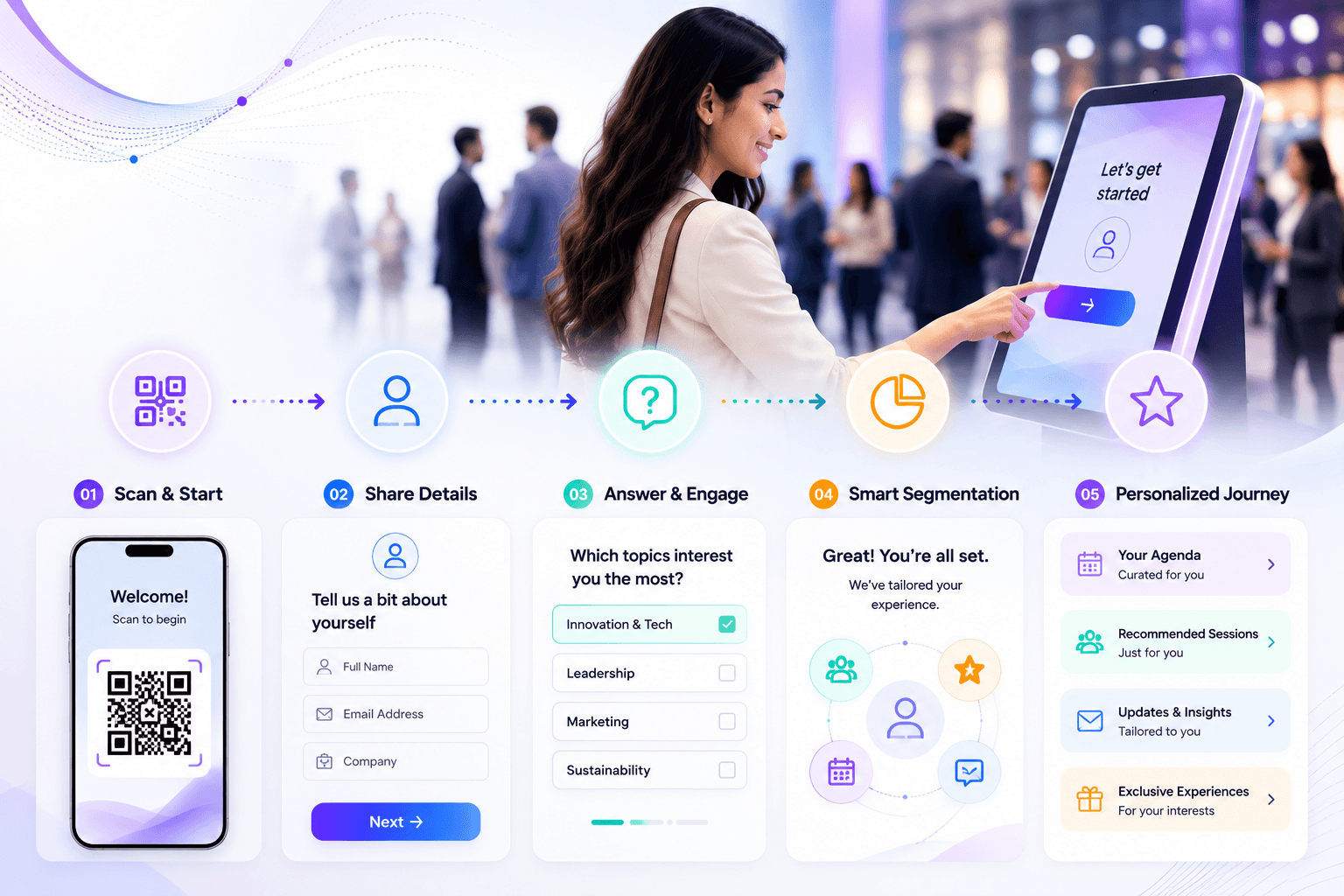
- 4 Category Allotment is Initiated: Based on the data collected through the registration form, the system allots what's needed, be it a track, a team, a persona or anything else.
- 5 Displaying the Result: Once everything has been sorted through properly, the user is shown their results on the screen, informing them about the category they've been put into which also details the sessions they're suggested, the team they're placed on for a later Crowdplay game, or even which badge design they will receive.
Registration, Becoming an Experience
Track Selection, A Choice that Matters
Instead of a dropdown, a few questions about interests and roles sort attendees into the track that actually fits their interests and preferences, rather than the one they guessed.
Finding Your Crew for Team Assignments
Guests are divided into teams at the check-in stage, feeding directly into a Team Battle Wall or a Crowdplay leaderboard that runs the rest of the day.
Badge Designs, Made Memorable
An attendee’s category can determine which Dynamic Overlay template or badge style they receive for the event.
Content that Caters to Specific Groups
Different categories can trigger different follow-up emails, sessions, recommendations, or even booth experiences later in the event, specific to the preferences and requirements of the attendees, enabling a more personalised experience which helps them connect naturally.
A Crowdplay Feature Under the Guise of Event Registration
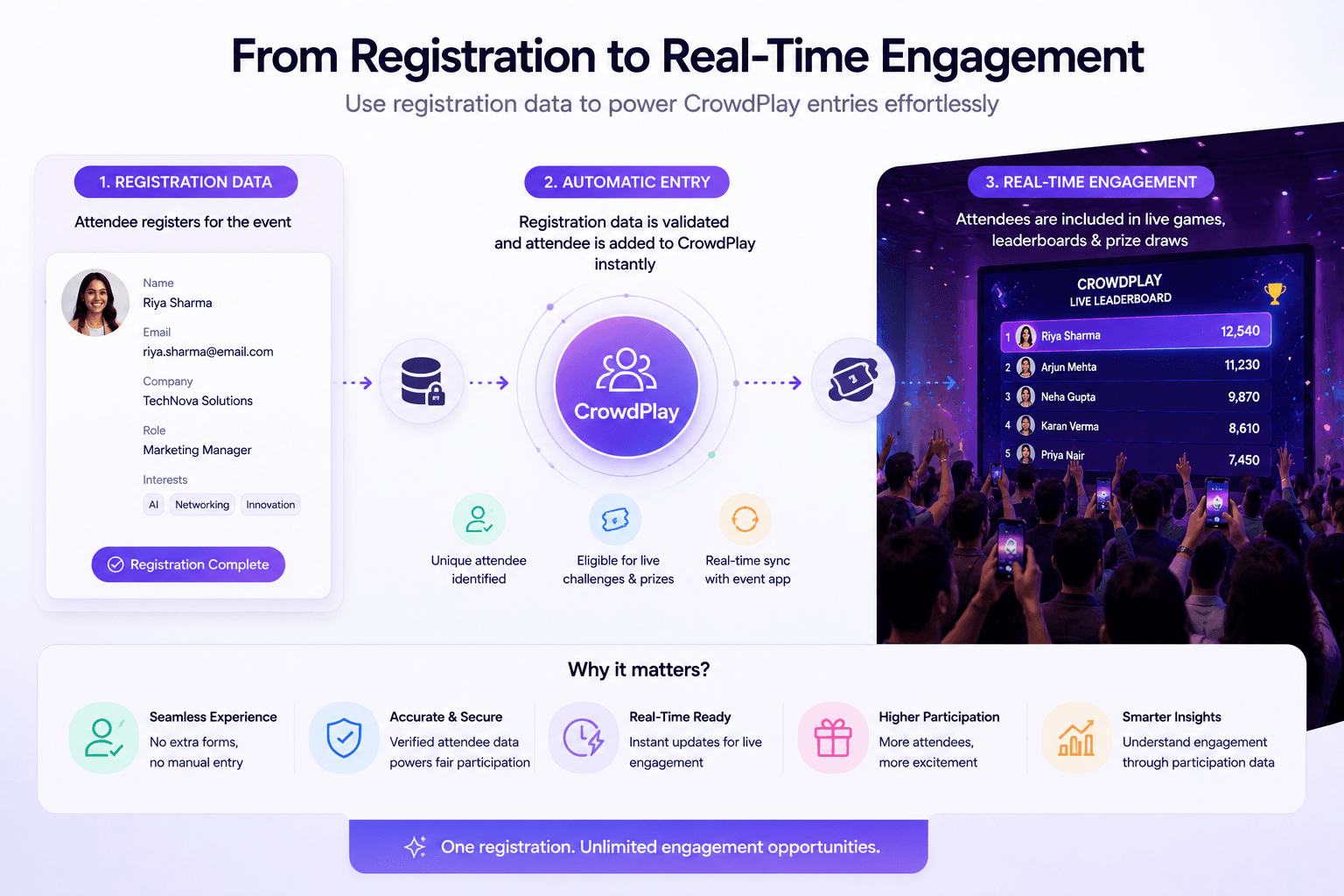
Under the surface, answer-to-segment onboarding runs on the same logic as any other crowdplay quiz which involves a set of questions, weighted answers and a result. The difference is where it sits in the guest journey: instead of being a mid-event engagement moment, it's the very first thing that happens, and its output, which is the category, becomes an input for everything that follows. It's covered as part of the bigger picture in our registration and lead capture guide, and the underlying mechanics are the same ones behind Quenth’s Crowdplay's quiz and poll engines.
Conclusion
Let registration be the first part of an event.
Event registration doesn't need to be a boring form which people rush through. It can be transformed into an interactive experience that makes attendees curious, engaged, and elated before they even walk through the door.
With gamified answer-to segment- onboarding, every question can become an interaction and every step can help to build momentum.
Here's to making every registration feel like the beginning of something grand.
Looking to explore a real answer-to-segment flow, start to finish? Book a demo and we'll help you walk through it.
FAQs
1. How many questions are ideal to get started with answer-to-segment onboarding?
As few as one can technically sort a guest into a category. However, most setups use somewhere around five to keep it quick while still producing a meaningful result. There's no upper limit though, organisers or brands may ask a few more, based upon their requirements.
2. How can the categories affect what happens later in the event, not just at check-in?
An attendee’s assigned category can segment them through team assignments, badge templates, session recommendations, and any other part of the event that's set up to read it.
3. What is the difference between a standard event registration form and answer-to-segment onboarding?
A standard event registration form is likely to be a dropdown where the guest self-selects one option. Answer-to-segment onboarding, on the other hand, evaluates a category from multiple weighted answers, which can produce a more accurate or more interesting result than a guest guessing which single option fits them best.
4. Can answer-to-segment onboarding slow down the check-in process?
Answer-to-segment onboarding adds a brief interactive step, so it does take slightly longer than a basic form, but for events where the segmentation itself adds value, for instance, team events, track-based conferences etc, this time is generally worth it. For high-speed, high-volume entry, a basic form or QR entry registration remains the faster option.
Related Articles





Your next event deserves better than the last one.
Twenty minutes. We'll show you what your event could look like if every photo carried a name, every display carried a face, and every output left attendees feeling seen.